AI Tools for DBAs: Automation, Monitoring & Safety
Table of Contents
- Introduction: AI Tools DBA Teams Can Use Today
- What Database Administrator AI and DBA Automation Actually Do
- AI Tools DBA Teams Should Compare
- AI Database Admin for Database Monitoring and Incidents
- Using AI for SQL Optimization and Capacity Planning
- A Six-Step DBA Automation Rollout
- Security, Privacy, and Common Pitfalls
- Four Practical AI Database Admin Examples
- Career-Relevant Skills
- Conclusion: Start With One Controlled Improvement
- Introduction: AI Tools DBA Teams Can Use Today
- What Database Administrator AI and DBA Automation Actually Do
- AI Tools DBA Teams Should Compare
- AI Database Admin for Database Monitoring and Incidents
- Using AI for SQL Optimization and Capacity Planning
- A Six-Step DBA Automation Rollout
- Security, Privacy, and Common Pitfalls
- Four Practical AI Database Admin Examples
- Career-Relevant Skills
- Conclusion: Start With One Controlled Improvement
Introduction: AI Tools DBA Teams Can Use Today
AI tools DBA teams use today can detect unusual activity, explain slow SQL, recommend indexes, automate routine maintenance, and accelerate analysis, but cannot safely run a database without human oversight. Production databases contain business records, customer information, campaign data, and financial transactions, so a confident but incorrect AI recommendation can cause an outage.
The useful question is not whether AI can replace a database administrator, but where database administrator AI and automated database administration can remove repetitive work without removing human control. This guide explains:
- How AI database admin systems work
- Which tools fit common database platforms
- How to introduce DBA automation safely
- What to measure during a trial
- Which skills will remain useful for DBAs
This is a practical starting point, even if you have never read an execution plan or configured a database alert.
What Database Administrator AI and DBA Automation Actually Do
A database stores information in tables or document collections. Applications query it to read or change data, and the engine chooses an execution plan, the route used to complete each query. Indexes work rather like the index in a book: they help the engine reach the required records without reading everything.
AI database tools for automated database administration examine query duration, CPU use, disk reads, locks, logs, execution plans, and historical workload patterns to detect changes or propose actions.
| Level | What the System Does | Example |
|---|---|---|
| Observe | Collects metrics and finds unusual behavior | Detects that checkout queries are taking twice as long as normal |
| Explain | Connects symptoms with possible causes | Associates the slowdown with blocking sessions or a changed plan |
| Recommend | Suggests a bounded action | Proposes an index or query rewrite |
| Act | Applies an approved or automatic change | Forces a previously successful plan and checks the result |
A chatbot that writes SQL is not closed-loop DBA automation: it generates text from a prompt. A closed-loop service observes the real workload, applies a limited change, measures the outcome, and reverses it if performance worsens.
My rule: the larger the possible effect, the stronger the evidence and approval process should be.
AI Tools DBA Teams Should Compare
The best product usually fits your database estate. A native cloud service may be easier to operate, while a separate monitoring platform can provide one view across vendors.
| Tool | Best Fit | Useful Capability | Limitation to Check |
|---|---|---|---|
| Azure SQL Automatic Tuning | Azure SQL Database | Creates indexes, removes selected indexes, or forces a previously good plan; verifies the result and can roll it back | Primarily useful inside the Azure SQL family |
| Gemini Cloud Assist for Cloud SQL | Cloud SQL teams | Investigates slow queries and periods of high database load | AI troubleshooting is in preview and investigations require Premium Support under current terms |
| Oracle Autonomous AI Database | Teams wanting a managed Oracle service | Automates provisioning, backups, patching, upgrades, and scaling | It is a database platform decision, not an add-on for every Oracle installation |
| CloudWatch Database Insights | Amazon RDS and Aurora | Provides fleet dashboards, database-load analysis, alarms, and on-demand investigations | Advanced features and retention can affect cost; AWS is moving users from Performance Insights |
| Redgate Monitor | Mixed SQL Server, PostgreSQL, Oracle, MySQL, or MongoDB estates | Uses query text and execution plans to explain poor performance and suggest changes | AI features require an eligible subscription; some alert analysis remains in preview |
| Datadog Watchdog with Database Monitoring | Teams already using Datadog | Learns expected behavior, detects anomalies, and connects database symptoms with application and infrastructure data | Can be more platform than a small database estate needs |
| SolarWinds DPA | Hybrid or multi-engine environments | Uses wait-time analysis, advisors, and anomaly detection to investigate slow work | Requires a monitoring repository and commercial licensing |
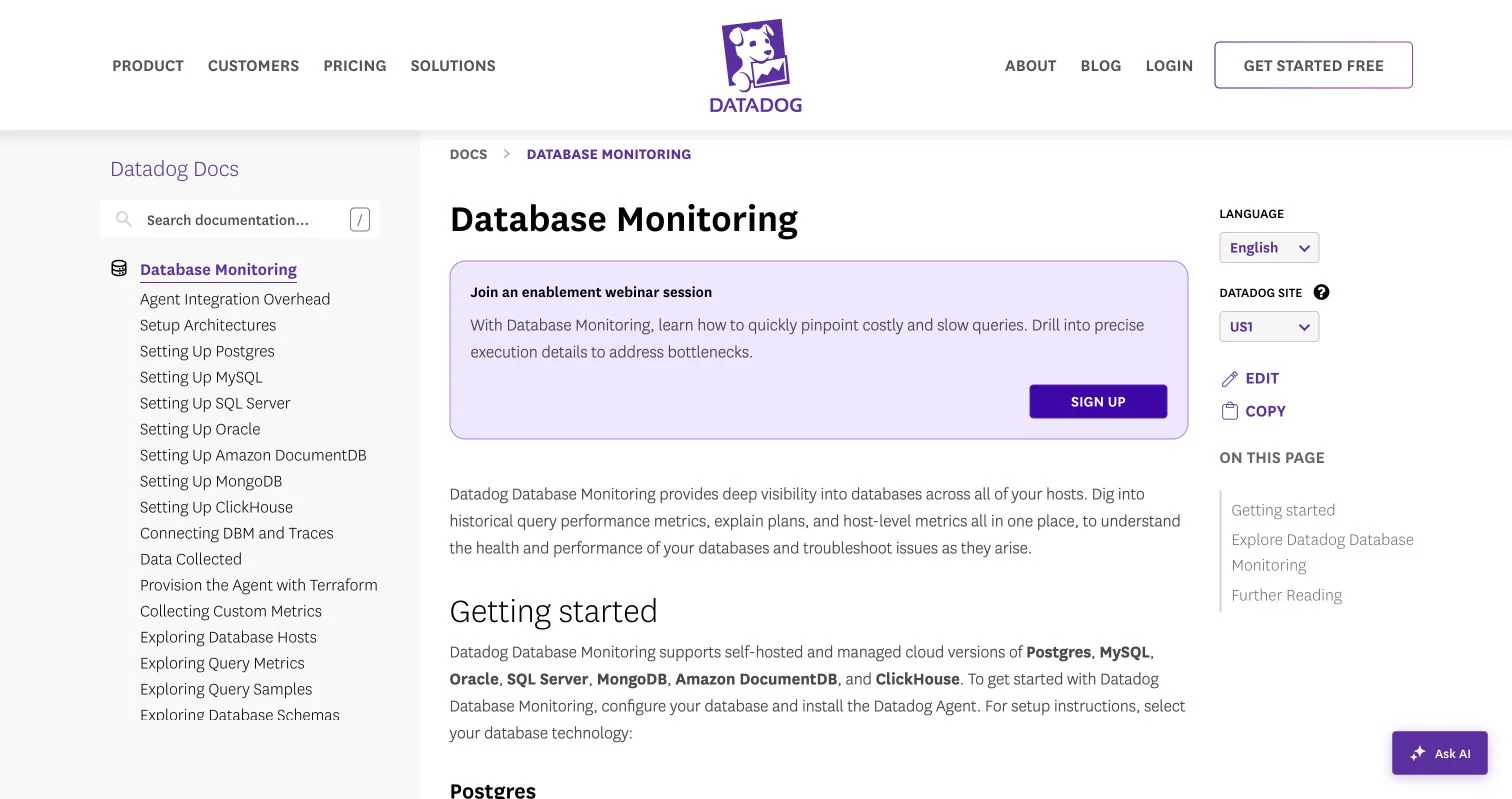
Datadog’s database-monitoring workflow combines query performance, explain plans, infrastructure metrics, and multiple database engines in one operational view.
Do not choose by feature names alone. Test two finalists on the same workload and incident scenarios; the clearer explanation often saves more time than a longer feature list.
AI Database Admin for Database Monitoring and Incidents
Traditional alerts warn when fixed thresholds are crossed, such as CPU exceeding 80 percent. Yet a short 85 percent spike during a planned import may be harmless, while a jump from 10 to 45 percent at 3 a.m. may be genuinely strange. AI-powered database monitoring uses period-specific baselines to detect abnormal behavior.
A useful AI database admin incident workflow:
-
Detect the change. Compare current query latency, connection counts, wait events, and resource use with the normal range for that time.
-
Measure business impact. Identify the affected application, dashboard, campaign, customer group, or transaction type; a slow internal report does not deserve the same response as failed payments.
-
Form a hypothesis. Check deployments, plan changes, blocking sessions, storage pressure, and traffic growth. AI can rank, but not prove, these possibilities.
-
Test a reversible response. Cancel one runaway report, temporarily add capacity, or restore a known plan, then record before-and-after measurements.
-
Document the incident. Save the timeline, evidence, action, result, and follow-up.
Datadog says Watchdog automatically creates expected-behavior baselines. SolarWinds says DPA uses less than 1 percent of production resources, though teams should verify overhead in their environment because DBA automation adds workload.
Using AI for SQL Optimization and Capacity Planning
For a marketing dashboard searching 80 million event records by campaign ID and date, a full-table scan may prompt AI to suggest a combined index, fewer selected columns, or earlier filtering.
Review the suggestion’s costs:
- Read benefit: How much will duration, CPU time, and logical reads fall?
- Write cost: Will the new index slow imports, updates, or deletes?
- Storage cost: How large will the index become as data grows?
- Operational risk: Can it be created online, and how will it be removed?
- Workload coverage: Does it help one frequent query or one rare report?
Azure’s automatic tuning service models safe DBA automation by validating applied recommendations for roughly 30 minutes to 72 hours, depending on query frequency, and reversing changes when it detects regression. Microsoft also reports that the underlying mechanisms have operated across several million databases.
AI database tools can also support capacity planning: forecast table growth, transaction-log growth, peak connections, memory pressure, and query demand separately rather than extrapolating total storage alone, then test against known events such as product launches or quarterly reporting. AI sees past patterns but cannot anticipate next month’s largest promotion without that context.
A Six-Step DBA Automation Rollout
For automated database administration, start with one measurable problem rather than the whole estate; this keeps the trial understandable and approval easier.
-
Create a baseline. Record at least two weeks of query latency, error rate, CPU, I/O, waits, alert volume, and DBA investigation time. Include peak and quiet periods.
-
Select a low-risk use case. Begin with read-only anomaly detection, alert summaries, log classification, or draft SQL explanations; defer autonomous schema changes until after the first trial.
-
Restrict access. Use a dedicated account with read-only access by default, and expose metrics, plans, and sanitized SQL instead of full table data when sufficient.
-
Build an evaluation set. Replay five to ten known incidents and check whether the database administrator AI system identifies the real cause, gives irrelevant advice, or misses important context.
-
Introduce approval gates. Require a DBA to review AI-recommended SQL, expected effect, rollback command, backup state, and maintenance window.
-
Expand only after measured success. Compare the trial with the baseline using mean time to detect, mean time to recover, false-alert rate, p95 query latency, change failure rate, and hours spent on routine checks.
The 2025 Stack Overflow survey found that 84 percent of respondents used or planned to use AI tools, but only 60 percent viewed them favorably. The gap is sensible: adoption does not prove reliability, and successful DBA automation produces measured operational improvements, not merely more generated recommendations.
Security, Privacy, and Common Pitfalls
Database prompts can reveal table names, customer fields, query values, and business rules.
Treat AI database tool prompts, execution plans, and generated SQL as operational data. IBM’s 2025 research put the average global data breach cost at $4.44 million, so read a tool’s data-handling terms before connecting production systems.
| Item | What to Check | Why It Matters |
|---|---|---|
| Permissions | Dedicated identity, read-only default, short-lived credentials | Limits damage from a wrong action or stolen token |
| Data sharing | SQL text, plans, logs, schema names, retention, training use, and processing region | Query text can contain personal or confidential values |
| Change control | Human approval, ticket reference, maintenance window, and rollback command | Keeps AI changes inside normal operating controls |
| Recovery | Recent backup, tested restore, replica health, RPO, and RTO | A backup is useful only when it can be restored in time |
| Audit trail | Prompt, evidence, recommendation, approver, command, and result | Makes incidents and compliance reviews explainable |
| Testing | Staging replay and production canary | Finds plan regressions before a fleet-wide change |
Redgate documents that its AI service may receive query text and execution plans, but not stored table data, and processes submitted content transiently. Other vendors make different choices.
Avoid four common mistakes: pasting production secrets into public chatbots, accepting invented SQL syntax, creating every suggested index, and allowing an agent to delete or modify data without a tested recovery path. The NIST AI Risk Management Framework offers a useful structure: govern the system, map its context, measure its behavior, and manage the resulting risk.
Four Practical AI Database Admin Examples
These realistic starting points use target numbers as evaluation goals, not guaranteed vendor results.
| Situation | AI-Assisted Response | Measurement |
|---|---|---|
| Campaign dashboard slows after launch | Detect the latency deviation, identify a full table scan, and draft an index recommendation for DBA review | Reduce p95 dashboard time from 12 seconds to under 4 seconds without raising import time by more than 5 percent |
| Checkout database reports intermittent locks | Group blocking events, identify the head blocker, and connect it with a recent application release | Cut mean diagnosis time from 45 minutes to 15 minutes and track repeat incidents |
| Storage grows unexpectedly | Forecast per-table growth and flag a new event table that is retaining raw records beyond policy | Restore 90-day retention and keep the next-quarter forecast below the storage limit |
| Nightly backup checks consume DBA time | Read backup logs, classify failures, and open a ticket with the affected instance and error evidence | Review every database daily while reducing manual log inspection from two hours to 20 minutes |
Each case follows the same pattern: collect evidence, propose and review a narrow action, then compare results with a baseline. This is more dependable than asking an AI database admin agent to make the system faster without defining faster.
The second example shows how cross-stack monitoring can help when database-reported locks stem from application code holding a transaction open; a database-only tool can describe only the symptom. A platform connected to deployment and trace data may connect it to the release that introduced the behavior.
Career-Relevant Skills
The strongest career strategy is understanding databases well enough to verify AI output better than a general assistant can produce it.
| Skill to Build | Why It Still Matters |
|---|---|
| SQL and execution plans | Lets you test whether a proposed rewrite changes joins, row estimates, or access paths correctly |
| Index design and locking | Exposes the write, storage, and concurrency cost hidden behind a simple recommendation |
| Backup and recovery | Provides the safety net for automated changes and real incidents |
| Cloud cost analysis | Connects scaling recommendations with actual spending |
| Security and data governance | Determines what an AI service may access, transmit, or retain |
| Communication | Turns technical evidence into a clear decision for developers and business owners |
Common questions:
Conclusion: Start With One Controlled Improvement
AI tools DBA teams can use already support database monitoring, SQL optimization, capacity forecasting, and routine log review. They are safest as assistants with evidence and limits, not unquestioned operators.
Start small:
- Measure one recurring database problem.
- Test an AI database admin tool with read-only access.
- Compare its advice with native database evidence.
- Require approval and a rollback plan for changes.
- Expand DBA automation only when the results improve latency, recovery time, alert quality, or staff workload.
The database still needs a responsible owner: AI can shorten the path from symptom to explanation, but the DBA must decide whether it fits the real system. These tools earn their place by combining faster analysis with informed human control.